
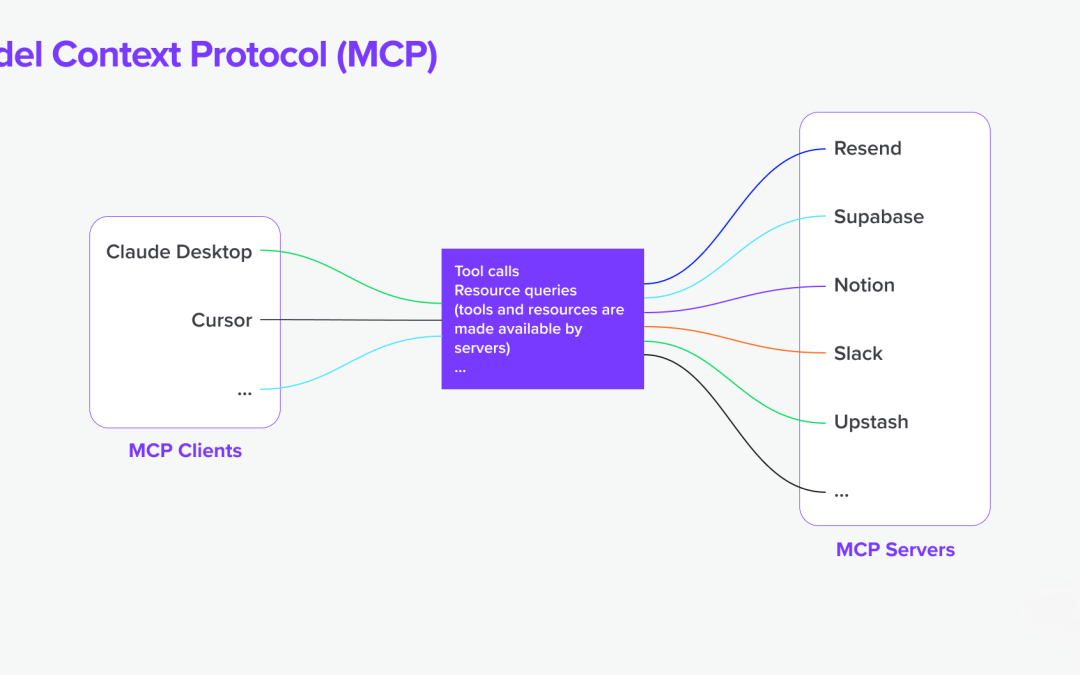
AI applications become more useful when they can work with current business information. Yet direct connections to every CRM, database, and internal API quickly create a fragile web of custom integrations.
When teams build MCP servers, MCP server architecture offers a cleaner boundary. The Model Context Protocol gives an AI host a consistent way to discover tools, request data, and call approved actions without embedding every business-system detail in the model application.
This guide explains the components, request flow, security controls, and design choices behind a reliable implementation.
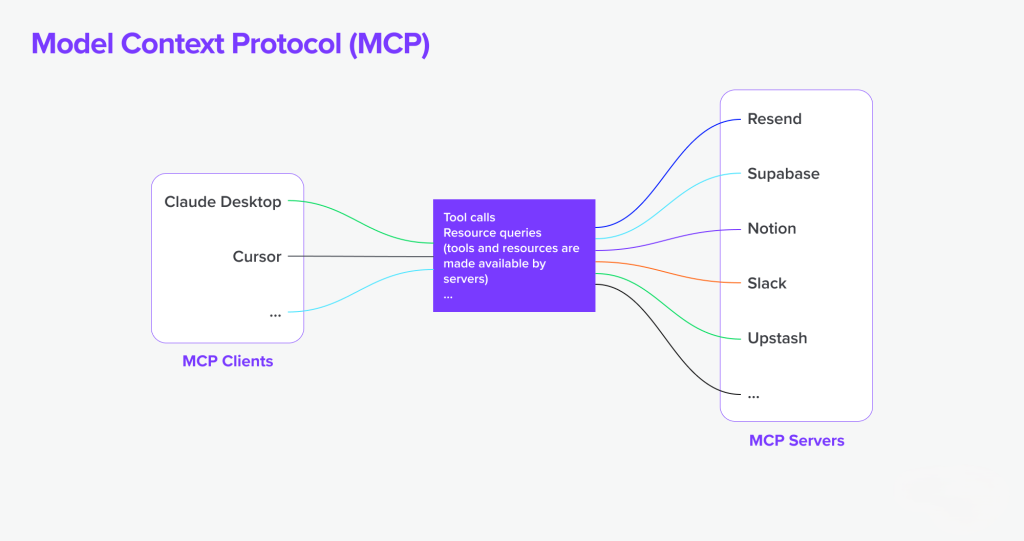
MCP creates a controlled integration layer between an AI application and business systems.
1. What Is the Model Context Protocol?
The Model Context Protocol, often shortened to MCP, is an open communication standard for connecting AI applications with external capabilities. Those capabilities may include tools, data sources, prompts, and business services.
A protocol is a shared set of rules. In this case, the rules help a host application learn what an MCP server can do and how to request that capability. The model does not need a unique integration for every target system.
The phrase model context describes the information and actions an AI model needs to complete a task. Context may include a customer record, a support ticket, a product catalog, or the result of a business calculation.
MCP does not replace a CRM, database, API, or ticketing system. It sits between an AI application and those systems. The MCP server translates a controlled protocol request into an action that the underlying system understands.
Key distinction: An MCP server is an integration component. It is not the business system that owns the data or performs the underlying operation.
The protocol standardizes how capabilities are described and requested.
2. Core Components of MCP Server Architecture
A useful MCP architecture has several separate roles. Keeping those roles distinct makes the system easier to secure, test, and maintain.
Host application and AI model
The host is the application that interacts with the user. It may be a chat interface, coding assistant, workflow application, or internal operations tool. The host supplies the model, manages conversations, and decides which MCP connections are available.
The model interprets the user prompt. It can select a tool when the host makes that tool available. The model should not receive unrestricted credentials or direct database access.
MCP client
An MCP client is the connection component inside the host. It maintains communication with one MCP server and handles protocol messages, capabilities, requests, and results.
A host may use several MCP clients. Each client can connect to a different server with a separate trust boundary. This design supports modularity and reduces the effect of a failure in one connection.
MCP server
An MCP server exposes a controlled set of capabilities. These capabilities can include tools that perform actions, resources that provide information, and prompt templates that guide an application.
The server owns the integration logic. It validates input, checks identity, applies authorization, calls an API or database, and returns structured output to the client.
Business tools, APIs, and data sources
A tool is an action. Examples include creating a ticket, searching a CRM, checking inventory, or starting a report. A data source provides information, such as a database table, document store, or analytics system.
APIs are often the safest connection to a business system because they provide defined operations. When direct database access is needed, the server should use restricted queries, read-only credentials where possible, and carefully controlled schemas.
Separate roles allow teams to control access at the server and tool boundary.
3. How an MCP Request Moves Through the System
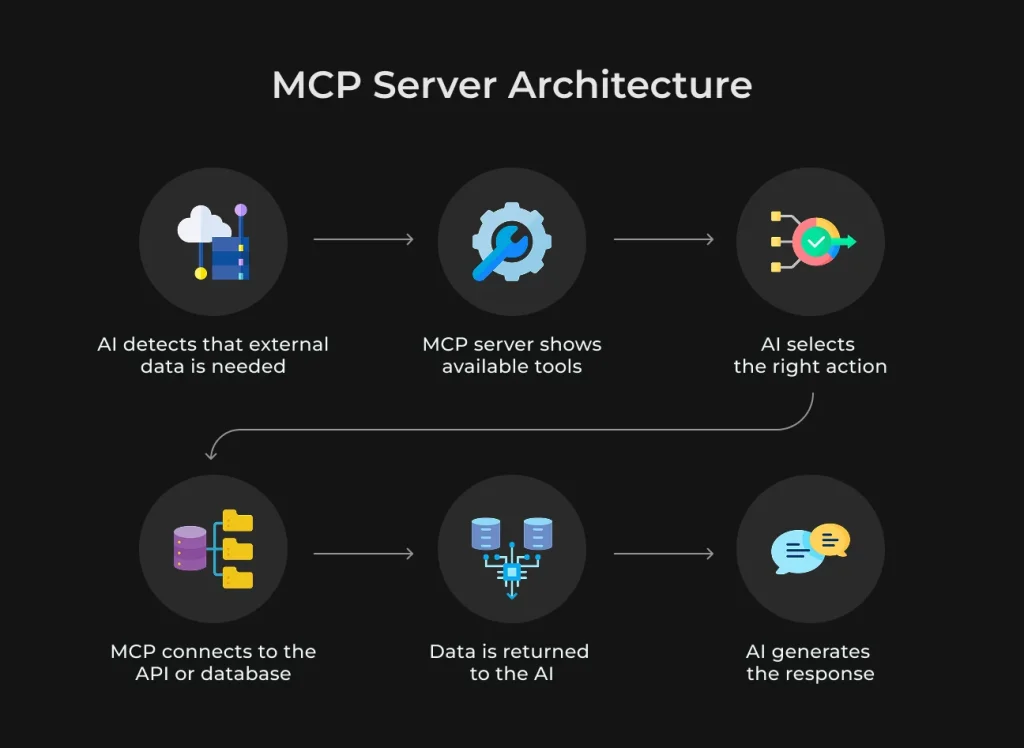
The request flow explains why MCP is useful. It turns an open-ended model response into a sequence of controlled interactions.
- User prompt: A user asks the application to find an account, summarize open tickets, or update a record.
- Model interpretation: The AI model identifies the information or action needed to answer the request.
- Tool discovery: The MCP client obtains the available server capabilities, including tool names, descriptions, input schemas, and limits.
- Authorization: The host and server check the user’s identity, application policy, scopes, and permitted business actions.
- Input validation: The server validates types, required fields, value ranges, identifiers, and business rules before calling a tool.
- Tool execution: The MCP server calls the underlying API, database, or business service using controlled credentials.
- Structured result: The server returns a defined result, error, or status message through the transport.
- Model response: The client gives the result to the model, which explains the outcome in language suited to the user.
In a local setup, stdio may carry messages between the host and server. Stdio means standard input and standard output. In a remote setup, a network transport may use server-sent events or another supported mechanism.
The model can suggest an action, but policy must decide whether that action is allowed. Treat tool calling as an authorization event, not as ordinary text generation.
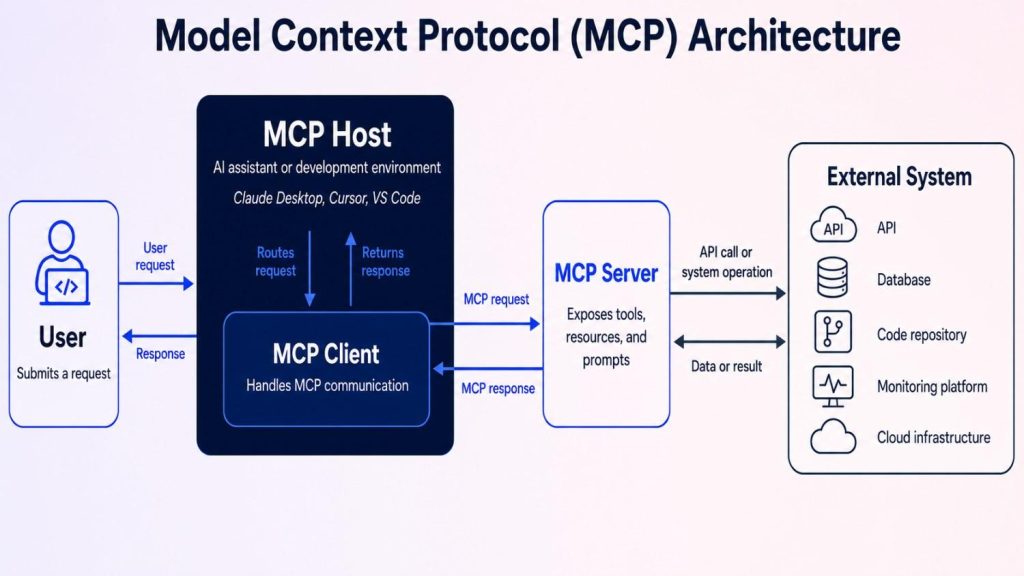
The flow should be documented before implementation begins.
Start with the protocol definition
Use the official reference to compare capabilities, transports, messages, and server behavior with your planned design.
Review MCP documentation
4. A Simple MCP Architecture Diagram
The following text diagram shows a common arrangement. The host application remains responsible for the user experience and model session. The MCP client manages protocol communication. The MCP server protects the business system.
User | v
Host application + AI model | v
MCP client | | protocol messages over stdio or remote transport v
MCP server |---- authorization and policy |---- input validation |---- tool routing |---- audit and error handling | +--> CRM API +--> Ticketing API +--> Internal database +--> Analytics service
The server should expose business-safe operations rather than raw infrastructure. For example, “find customer by approved identifier” is safer than exposing a general SQL execution tool.
The architecture can include one server or many servers. The correct choice depends on ownership, risk, deployment boundaries, and the number of systems involved.
Keep the server boundary visible in architecture documents and code reviews.
5. Practical Example: An AI Assistant Using a CRM
Imagine a sales assistant that receives this prompt: “Show the latest open opportunities for Acme and summarize the next actions.”
When teams build MCP servers, the host sends the conversation to the model, which can then access a CRM search tool exposed by the MCP server. The tool description defines the required account identifier, allowed filters, and expected result format.
The MCP client asks the server to call the tool. The server confirms the user’s identity and checks whether the user can view Acme’s sales records. It rejects an unknown account identifier rather than passing an unrestricted query to the CRM.
After validation, the server calls the CRM API. It requests only the fields needed for the summary. The response may include opportunity names, stages, values, owners, and next-action dates.
The server removes fields that the user cannot see and returns structured data. The model then summarizes the records. It can cite the opportunity names and dates supplied by the server, but it should not invent missing details.
Why the boundary matters
The CRM remains the system of record. The MCP server does not duplicate all CRM logic. Instead, it provides a narrow interface designed for the AI use case.
This pattern also supports safe write actions. A separate tool could draft a follow-up task. Creating that task should require a clear user confirmation, a valid owner, and an authorization check immediately before execution.
A CRM MCP server should expose narrow, business-safe actions.
6. One MCP Server or Multiple Specialized Servers?
One MCP server can be suitable for a small application with a closely related set of tools. A single deployment may simplify local development, configuration, and monitoring.
Multiple specialized MCP servers can be a better choice when systems have different owners, credentials, data classifications, or uptime requirements. This approach is especially useful for organizations that build MCP servers around specific business functions. A CRM server, support server, and analytics server can each maintain a smaller, more focused capability set.
One server
Use one boundary when the tools share a trust model and release cycle.
- Simple connection management
- Centralized observability
- Lower deployment overhead
Specialized servers
Split the architecture when teams or systems need independent control.
- Separate credentials
- Smaller blast radius
- Independent versioning
Hybrid model
Use a shared host with focused servers for high-risk or high-value domains.
- Clear ownership
- Flexible scaling
- Domain-specific policies
Avoid splitting servers only to create more network hops. Each extra server adds transport, latency, deployment, and debugging concerns. Split when the security or ownership benefit is real.
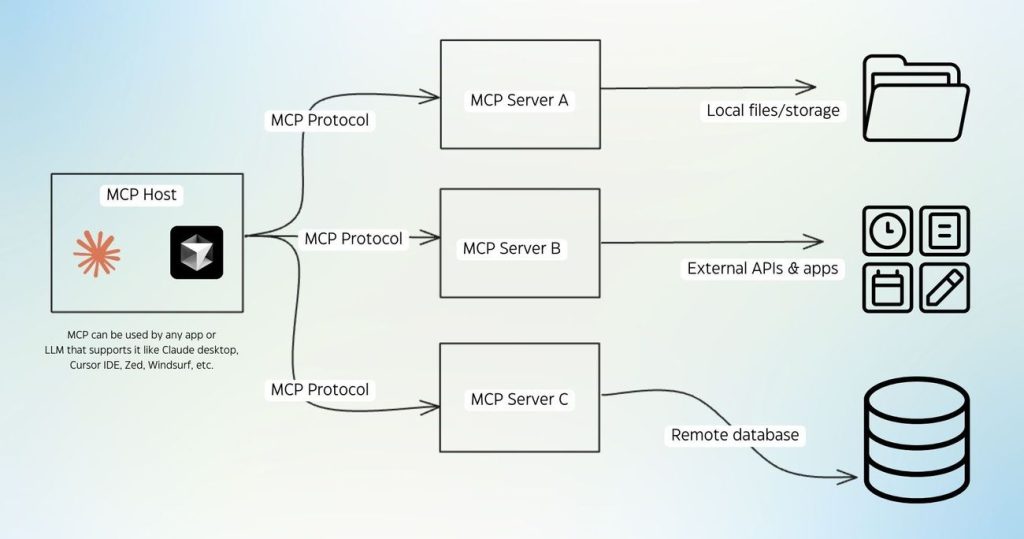
Choose server boundaries based on trust, ownership, and operational needs.
7. Why Teams Use MCP Server Architecture
The main benefit is standardization. A host can work with different servers through a common context protocol instead of learning a separate integration pattern for each system.
Modularity is another advantage. Developers can update a CRM integration without rewriting the entire application. A server can also be reused by several AI applications when its security model and data contract are appropriate.
Interoperability improves when tools describe their capabilities in a consistent way. The host can discover available actions rather than relying on hard-coded assumptions.
Maintainability improves when business-system details stay behind the server. API changes, field mapping, retries, and error translation have one controlled home.
Controlled access is especially important. The server can apply identity checks, scopes, rate limits, field filtering, and approval steps before an action reaches a business system.
Architecture strengths
- Common protocol for tools and resources
- Reusable integrations across applications
- Clear boundary for security controls
- Independent server deployment and testing
Trade-offs to manage
- Another service to operate
- Transport and network latency
- More detailed authorization work
- Protocol and schema versioning needs
The value comes from a consistent boundary, not from adding protocol complexity by itself.
8. Security and Reliability Design Considerations
Security must be part of the MCP architecture from the first design session. A useful tool can also create risk if it exposes excessive data or performs irreversible actions without control.
Authentication and authorization
Authentication establishes who is making a request. Authorization decides what that identity can do. Use short-lived credentials where practical, keep secrets outside prompts, and define scopes for each tool.
Apply least privilege. A read-only reporting tool should not share credentials with a record-deletion tool. User permissions should be checked at the server and, where possible, at the underlying business system.
Validation and unsafe calls
Validate every input against a strict schema. Do not trust a tool argument because it came from a model. Check identifiers, numeric limits, dates, query size, and action parameters.
Prompt injection is an attempt to manipulate the model through untrusted instructions in user input or retrieved data. Treat retrieved text as untrusted. Do not allow content from a document or ticket to override server policy.
High-impact actions should use confirmation, approval, or a two-step workflow. The user should know what will happen before an external system changes.
Output handling
Return structured output with clear status, fields, and source information. Remove unnecessary sensitive data. Limit result size to avoid excessive context, cost, and accidental disclosure.
Error management and observability
Use stable error categories for authentication failures, validation errors, rate limits, upstream failures, and timeouts. Log request identifiers, tool names, latency, status, and policy decisions without logging secrets or unnecessary personal information.
Never treat a successful model response as proof that a business action succeeded. The server should report the actual upstream result and preserve an audit trail.
Security controls belong at the tool boundary and should be measurable.
9. Transport, Scaling, Latency, and Versioning
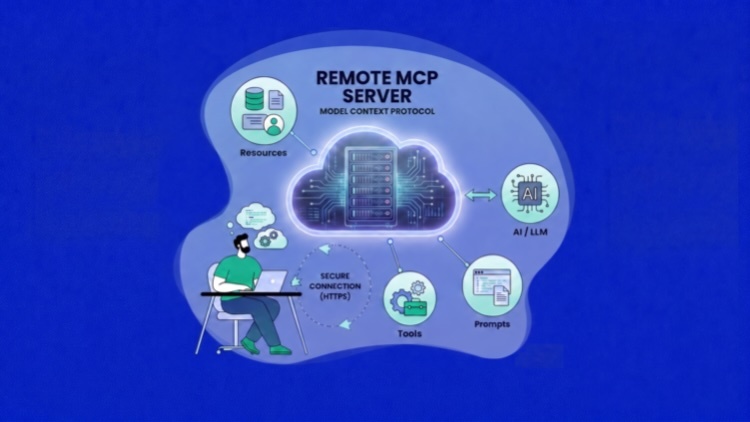
Transport is the method used to carry protocol messages. Stdio is useful for local processes because the host can start a server and communicate through standard input and standard output. Remote MCP connections need network transport, identity handling, timeouts, and connection management.
Server-sent events can support a remote pattern in which the server sends events to the client. Teams should select a transport that matches their deployment model and the supported protocol behavior. Document reconnection and failure handling before production use.
Scalability and latency
Measure the complete path: model time, client processing, transport time, server work, and upstream API latency. Cache safe reference data, paginate large results, and set explicit timeouts.
Remote MCP deployments may need horizontal scaling. Shared session state, rate limits, idempotency keys, and connection routing must be understood before adding more server instances.
Versioning
Tool names and input schemas are part of the client contract. Avoid breaking changes without a migration plan. Add fields in a backward-compatible way, document deprecated actions, and test the host against every supported server version.
Capability discovery should not be treated as a security decision by itself. A tool being visible does not mean every user can call it. Authorization remains an independent control.
Operational quality depends on transport behavior as much as tool logic.
10. Implementation Checklist for a Secure MCP Architecture
Use this checklist before exposing an MCP server to production users. It turns broad design goals into reviewable engineering tasks.
- Define the host, MCP client, server, and system of record
- Document supported capabilities and transport
- Choose one server or specialized servers for clear reasons
- Keep business logic and credentials behind the server
- Authenticate every remote request
- Apply least-privilege scopes per tool
- Validate all model-supplied arguments
- Require confirmation for high-impact actions
- Set timeouts, retries, pagination, and rate limits
- Return structured success and error results
- Track latency, failures, tool use, and policy decisions
- Plan schema, capability, and server version changes
Recommended implementation sequence
A checklist makes design reviews consistent across applications and teams.
Turn the checklist into an architecture review
If your team is connecting an AI application to sensitive business systems, request a review of the server boundary, tool permissions, transport, and operating model.
Request an architecture review
Frequently Asked Questions About MCP Server Architecture
Is an MCP server the same as an API?
No. An API exposes operations for applications. An MCP server exposes AI-ready capabilities through the Model Context Protocol and often calls one or more APIs behind the boundary.
Can an MCP server connect directly to a database?
It can, but access should be narrow and controlled. Prefer approved queries, read-only credentials, row and field filtering, query limits, and clear audit records.
Should every tool be allowed to change data?
No. Start with read-only use cases. Add write actions only when the action has strong validation, authorization, confirmation, idempotency, and rollback or recovery procedures.
When is a remote MCP server appropriate?
A remote MCP server is useful when the host and integration run in separate environments or when several applications need the same controlled capabilities. Add network security, identity, monitoring, and failure handling.
Conclusion: Build the Boundary Before the Integration
MCP server architecture gives teams a practical way to connect AI models with business tools and data. The host manages the user experience, the MCP client manages protocol communication, and the MCP server controls access to APIs, databases, and business services.
The strongest designs use narrow tools, explicit schemas, least-privilege credentials, strict validation, structured output, useful errors, and measurable operations. They also distinguish the MCP server from the underlying system of record.
Start with one well-defined use case. Map the request flow, select the smallest useful capability set, test denied and unsafe requests, and expand only after the boundary is reliable. This approach supports standardization, reuse, interoperability, and controlled growth without hiding security decisions inside model output.
Design the boundary first, then expand the capabilities behind it.
Architecture Review Request
Work emailPrimary business systemArchitecture question
Share the system, use case, and main security or scaling concern.Send review request