
An AI agent can do more than answer a question when it connects to an MCP server. It may read a file, call an API, query a database, or execute code. Each capability creates a path to valuable systems and data.
MCP server security is the discipline of controlling those paths. When teams build MCP servers, security must cover identity, permissions, transport, tool behavior, logging, and response. The goal is not to make an agent powerless. The goal is to make every action known, limited, authorized, and reviewable.
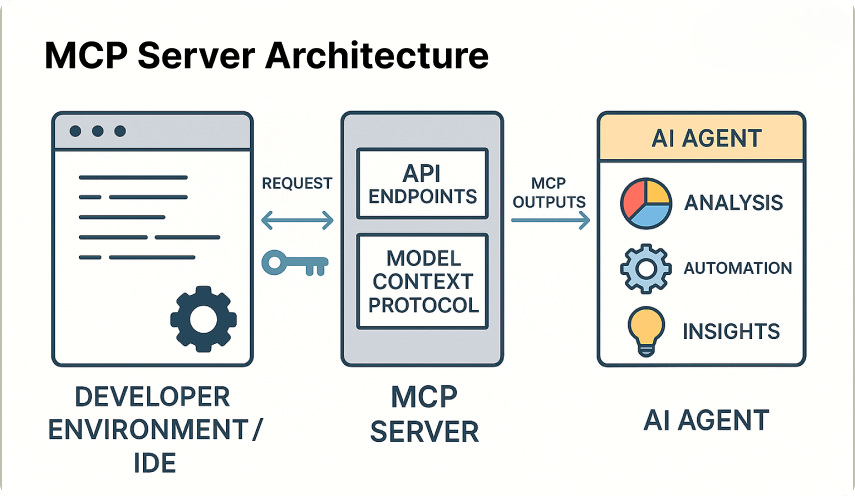
An MCP deployment creates several security boundaries, not one single boundary.
What MCP Server Security Protects
The Model Context Protocol is a standard way for an AI application to discover and use external capabilities. An MCP client connects a model to one or more MCP servers. Those servers may expose tools, resources, and prompts that reach external systems.
Security must be applied at each boundary. When teams build MCP servers, the client needs protection from unsafe instructions and untrusted server behavior. The MCP server needs strong identity checks and narrow permissions. Connected tools need validation and isolation, while the data layer requires encryption, retention rules, and access controls.
Client boundary
The mcp client chooses which servers and tools it can use. It should display sensitive actions, enforce user approval, and avoid treating model output as trusted policy.
- Server trust and configuration
- User consent for risky actions
- Safe handling of context
Server boundary
The mcp server authenticates callers and decides which capabilities are available. It should enforce permissions even when a client or model sends an unsafe request.
- Identity and session control
- Tool authorization
- Audit and rate limits
Data boundary
Tools often connect to systems that hold sensitive records. Those systems need their own controls. MCP security does not replace database, cloud, network, or application security.
- Encryption and secrets management
- Tenant isolation
- Retention and redaction
Security requirements vary with the deployment model, transport, identity provider, exposed tools, user roles, and data sensitivity. A read-only internal server has a different risk profile from a public server that can change production systems.
What the Ranking Pages Do Well With CTAs
The three ranking results represent a strong pattern for this search intent. SocPrime focuses on risks and mitigations. Praetorian frames MCP as an emerging attack surface. Descope presents best practices through an identity and access lens. Each approach supports an educational journey before a commercial conversation.
| Ranking page | Primary goal | Likely audience | CTA role | Recommended lesson |
| SocPrime risk and mitigation article | Inform and create security interest | B2B security and engineering readers; cold to warm | Move from risk discovery toward a security product or expert discussion | Pair each risk with a practical mitigation before asking for action |
| Praetorian MCP attack surface article | Inform and build authority | Security leaders and technical evaluators; cold to warm | Create interest in assessment, advisory, or security services | Use a clear problem frame, then make the next step specific |
| Descope MCP best-practices article | Inform while supporting identity-product consideration | Developers, architects, and identity teams; warm prospects | Connect best practices with an online identity or access solution | Align the offer with the control discussed in the section |
For this keyword, an aggressive “buy now” message would be poorly matched to the search stage. A reader may be comparing transports, defining tool scopes, or preparing a review. A native CTA performs better when it offers a useful artifact, such as a deployment checklist, a control mapping, or a scoped security review.
Start with a practical security check
Use the controls in this guide to identify identity, permission, tool, and data gaps before you plan a production rollout.
Jump to the checklist
MCP Server Security Threat Model
A threat model describes what must be protected, who may attack it, and how an attack could move through the system. Begin with the data flow. Mark the user, model, mcp client, mcp server, tool, external system, and data store. Then record every trust boundary.
Map both direct attacks and attacks that use the model as an unintended intermediary.
Identity and credential threats
Unauthorized access may begin with a weak identity check, a leaked token, or a session that remains valid after the user signs out. Stolen credentials can let an attacker call tools without needing to compromise the model itself.
Use separate identities for users, services, and automation. Do not place long-lived secrets in prompts, configuration files, source code, or tool output. Treat token handling as an application security problem, not as a special feature of the context protocol.
Instruction and delegation threats
Prompt injection attempts to influence the model or agent with hostile instructions. The instruction may arrive through a web page, document, email, issue, database row, or tool response. A confused-deputy attack occurs when a more trusted component performs an action for a less trusted caller.
The model should never be the final authority for a sensitive action. The server must verify identity, permissions, resource scope, and approval state using trusted application data.
Capability and supply-chain threats
Excessive tool permissions increase the impact of a mistake or attack. A malicious or compromised tool can return misleading content, request secrets, or attempt unsafe execution. Vulnerable dependencies can expose the server even when its own code appears correct.
- Limit tools by role, tenant, environment, and task.
- Review tool owners, source code, dependencies, and release history.
- Block shell and file access unless there is a clear business need.
- Record tool versions and scan them for known vulnerabilities.
Authentication for MCP Servers and Clients
Authentication answers a basic question: who is calling? Authorization answers a different question: what may that caller do? Keep the two decisions separate. A valid identity should not receive automatic access to every tool or resource.
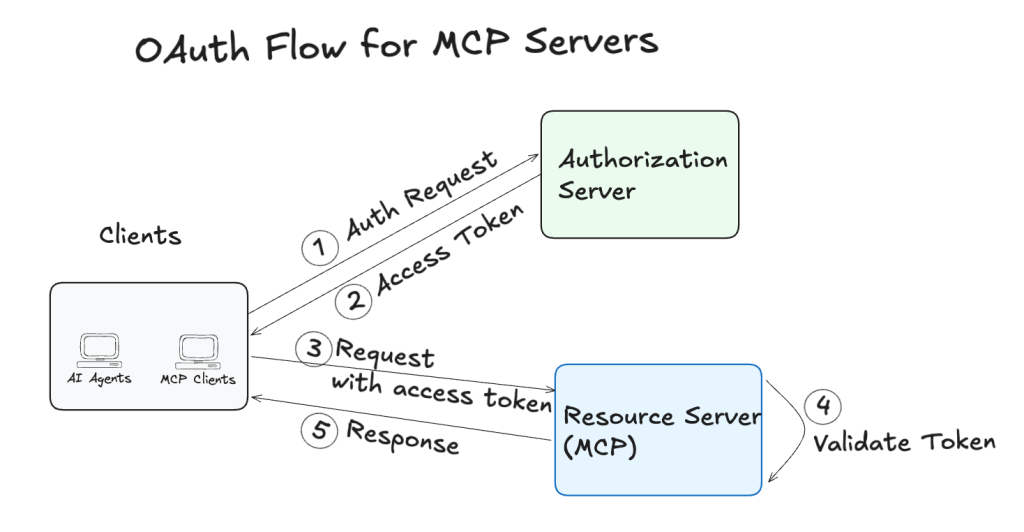
Identity verification should occur before the server exposes sensitive capabilities.
Use strong identity verification
Use an established identity provider when possible. OAuth 2.1 is appropriate for many delegated user flows, subject to the provider, transport, and deployment design. Validate the issuer, audience, signature, expiry, scope, and relevant claims. Do not accept a token only because it is correctly formatted.
For service-to-service traffic, mutual TLS may be suitable when both sides need certificate-based identity. Other protections may include workload identity, private network paths, signed requests, or an API gateway. Select controls based on the environment rather than applying a protocol label without checking the actual trust model.
Reduce token exposure
- Prefer short-lived access tokens with narrow scopes.
- Store tokens in a protected secret store or platform credential vault.
- Do not send bearer tokens to the model or expose them in tool results.
- Rotate credentials on a planned schedule and after suspected compromise.
- Revoke sessions when a user, device, or service loses trust.
Manage sessions deliberately
Bind sessions to the correct user, client, tenant, and server. Define idle and absolute timeouts. Protect session identifiers from fixation and replay. Recheck important claims when a session is refreshed, especially when permissions or employment status can change.
Authentication is not a permission grant. A successful login should lead to a policy decision for the requested action, resource, and current context.
Authorization, Permissions, and Consent
Authorization is where MCP security becomes operational. The server should evaluate every tool call, not only the first connection. A permission decision should consider the identity, tool, action, resource, tenant, environment, and risk level.
Least privilege
Give each user and service only the capabilities needed for a defined task. Start with read-only access. Add write, delete, export, or execution rights only when a business process requires them.
- Per-user tool permissions
- Resource-level restrictions
- Separate production and test roles
Explicit approval
Require user confirmation for actions that change records, send messages, move money, alter access, export data, or execute code. Show the target, scope, and effect before approval.
- Clear action summaries
- Approval expiry
- Separation of duties
Use role and attribute policies
Role-based access control groups permissions by job function. Attribute-based access control adds conditions such as tenant, location, data classification, device trust, time, and environment. A combined model can prevent a support user from reading another tenant’s records even if both users share the same broad role.
Write policies in terms of real actions. “Use the database tool” is too broad. “Read open tickets assigned to this user’s team” is easier to review and enforce. The tool schema should not be the only place where policy is documented.
Separate decision, approval, and execution
For high-risk actions, the component that proposes an action should not be the only component that approves and executes it. This separation reduces the chance that prompt injection or a compromised tool can create an approved-looking request.
Approval is not a substitute for authorization. The server should still verify the user, policy, resource, and current state after approval and immediately before execution.
Data Protection Across the Context Protocol
MCP servers can expose sensitive data through normal responses, error messages, logs, prompts, and model context. Data protection must therefore cover the full path from source system to tool output and back to the user.
Protect data in transit, at rest, in context, in responses, and in operational records.
Protect transport and storage
When teams build MCP servers, they should use TLS for network traffic and validate certificates. Avoid exposing an MCP server over an open network when a private route, gateway, or authenticated proxy is more suitable. Encrypt sensitive records at rest and manage keys separately from the data they protect.
Keep secrets in a dedicated secrets management service. Restrict which server process can retrieve each secret. Never use a general database query tool as a substitute for controlled secret access.
Minimize and filter context
Send only the data needed for the current action. Remove unused fields before data reaches the model. Mask account numbers, tokens, personal identifiers, and internal notes when they do not support the task. Apply filtering at the server and tool layer, not only in the user interface.
Protect tenants and operational records
Enforce tenant isolation in every query and tool call. Do not rely on a model instruction such as “show only this customer’s records.” The server should derive tenant scope from a trusted identity and apply it in the data layer.
Logs can contain the same sensitive information as tool results. Redact secrets and personal data. Define retention limits, restrict log access, and record enough detail to investigate without storing unnecessary content.
Tool and Resource Security
A tool is an execution boundary. Its name and description do not make it safe. Validate input, constrain the operation, and validate output before the result enters model context or reaches a user.
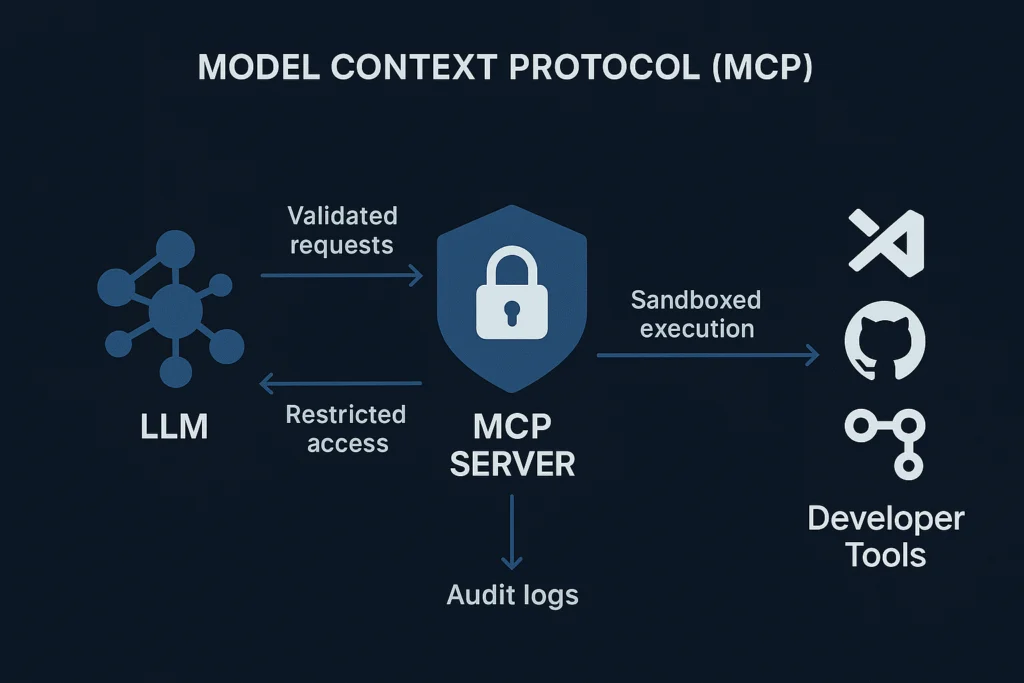
Tool security combines validation, policy, isolation, and controlled output.
Validate input and schema
Use strict schemas for every tool. Reject unexpected fields, invalid types, oversized values, unsafe characters, and ambiguous identifiers. Normalize paths and URLs before checking them. Validate again after normalization so that encoded traversal sequences cannot bypass a rule.
Control file and shell access
File-system tools should use an allowlisted root directory. Resolve the final path and confirm that it remains inside that directory. Shell tools should be avoided when a narrow API can perform the same task. If execution is necessary, use a sandbox with limited network access, memory, CPU, files, and runtime.
Do not construct shell commands by joining model-generated strings. Use safe process APIs with fixed arguments and explicit allowlists. Treat all model and tool input as untrusted, even when it appears to come from an internal system.
Validate output and dependencies
Output validation can detect unexpected fields, excessive size, hidden secrets, and content that should not enter the model context. It cannot prove that a result is truthful, so downstream systems still need normal integrity checks.
Pin and scan dependencies. Review transitive packages, container images, build actions, and release artifacts. Maintain an inventory of mcp servers, tools, versions, owners, and data access. Remove unused capabilities rather than leaving them dormant.
Monitoring and Incident Response
Prevention controls will not catch every attack. Monitoring shows how the system behaves and gives responders a way to contain damage. Log authentication events, authorization decisions, tool calls, resource identifiers, policy outcomes, approvals, and errors.
Monitoring should connect events to identities, tools, resources, and policy decisions.
Detect unusual behavior
- Repeated denied actions from one identity or client.
- New tools called by an established service.
- Large exports or unusual data volume.
- Access outside normal hours or locations.
- Rapid calls that suggest automation abuse.
- Unexpected changes to tool or server configuration.
Use rate limiting at the gateway and tool layer. A limit should consider user, client, tool, tenant, and resource. Record both accepted and rejected calls so analysts can see the attempted path.
Prepare for containment
Document how to revoke access, disable a tool, rotate a credential, isolate a server, and preserve evidence. Keep an emergency read-only mode when the business process allows it. Test the response with scenarios such as a leaked token, compromised tool dependency, prompt injection, or accidental data export.
Preserve timestamps, request identifiers, policy results, approvals, tool versions, and relevant network records. Avoid changing or deleting evidence during the first response. Coordinate with privacy, legal, and compliance teams when personal or regulated data may be involved.
Common MCP Security Implementation Mistakes
- Trusting tool descriptions as policy
- Giving every client the same capabilities
- Passing secrets through model context
- Logging full prompts and tool results
- Using broad shell or database access
- Skipping dependency and server inventory
- Enforce policy in trusted server code and data systems
- Use identity, role, tenant, and resource scopes
- Use a protected secret store and narrow retrieval paths
- Redact sensitive fields and limit retention
- Replace broad execution with narrow, validated functions
- Track owners, versions, risks, and update status
Do not confuse convenience with permission
Automatic approval may make a demo feel smooth, but it hides the cost of a wrong action. Begin with explicit approval for sensitive actions. Measure false approvals, rejected calls, and user friction. Then refine the flow with evidence.
Do not place all trust in the model
Models can interpret context, but they are not a reliable policy engine. They can follow malicious instructions, misunderstand scope, or select an unsafe capability. Keep identity, permission, validation, and execution decisions in deterministic controls.
Do not treat MCP as a complete security layer
MCP security works alongside secure coding, network controls, endpoint protection, cloud identity, database permissions, vulnerability management, backup controls, and privacy practices. A secure protocol flow cannot repair an overprivileged database account or an exposed cloud secret.
MCP Server Security Checklist Before Deployment
Use this checklist during design, before release, and after meaningful changes to tools, identity, data, or transport. Mark an item complete only when there is evidence, such as a policy, test, configuration record, or audit event.
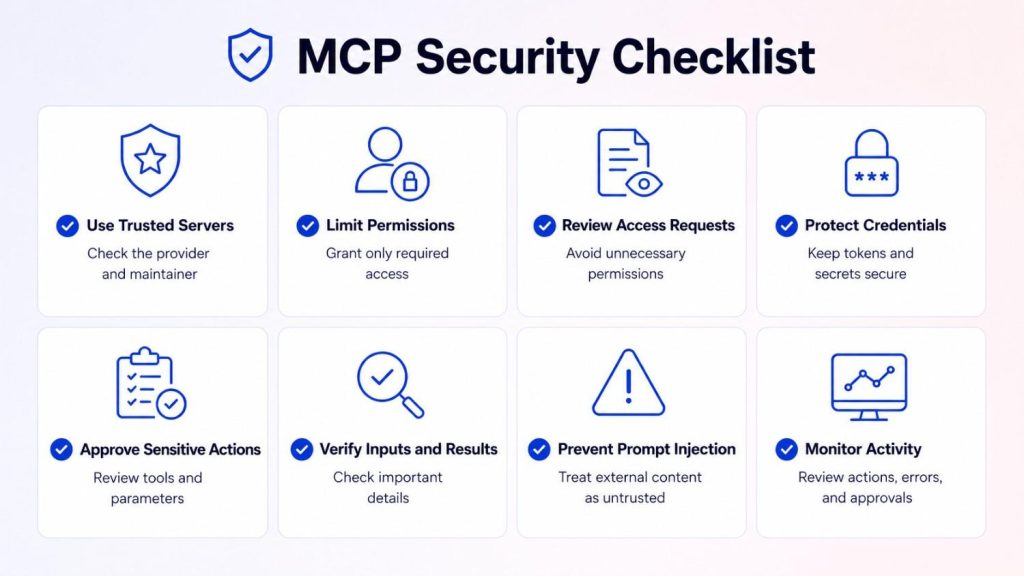
A repeatable checklist turns security guidance into deployment evidence.
Identity and transport
- Document every mcp client, server, user, and service identity.
- Use TLS and verify certificates for network connections.
- Validate token issuer, audience, expiry, signature, and scope.
- Use short-lived tokens and protected credential storage.
- Define session timeout, revocation, and rotation procedures.
Permissions and tools
- List each tool, resource, owner, version, and data path.
- Apply least privilege and read-only defaults.
- Enforce tenant and resource restrictions in trusted code.
- Require approval for high-impact actions.
- Validate schemas, paths, commands, outputs, and dependencies.
Data and operations
- Encrypt data in transit and at rest.
- Mask secrets and sensitive fields in context and logs.
- Set retention limits for prompts, responses, and audit records.
- Alert on unusual access, exports, denials, and tool behavior.
- Test revocation, isolation, credential rotation, and evidence capture.
Request a deployment review
For a production mcp server, document the deployment model, identity provider, transport, tools, data classes, and current controls. A scoped review can then focus on the risks that matter to your system.NameWork emailDeployment details
Include only high-level information. Do not submit credentials, tokens, personal records, or confidential production data.Request a scoped review
Choosing the Right CTA for MCP Security Content
The best CTA depends on the reader’s next unresolved question. A cold reader often needs a framework. A warm reader may need a control mapping or architecture review. A hot reader may be ready to discuss a production deployment, but the article should not assume that every visitor is at that stage.
Cold visitor
Offer a checklist or concise control map. The desired action is a download or a jump to a structured resource. Keep the tone neutral and useful.
Use the checklist
Warm evaluator
Offer a self-assessment or architecture review. Explain the scope, expected preparation, and output. The desired action is a qualified request.
Review deployment controls
Production team
Offer a scoped consultation. State that the review covers identity, permissions, data, tools, monitoring, and operational response.
Request a review
Use button text that describes the result. “Download the MCP security checklist” is clearer than “Learn more.” “Request a scoped deployment review” sets a more accurate expectation than “Get protected.” The surrounding paragraph should explain what information the reader may need and what the next step looks like.
Make the next step concrete
Choose the checklist if you are still designing controls. Request a scoped review if your mcp server already connects to production tools or sensitive data.
Choose your next step
Build MCP Servers Security in Layers
Secure MCP deployments do not depend on one feature or one vendor. They use defense in depth across the mcp client, mcp server, connected tools, external systems, and data stores.
Start with strong identity verification. Apply least privilege and explicit authorization to every action. Protect transport, storage, context, and logs. Validate tools and dependencies. Monitor behavior, prepare for revocation, and test the response before an incident occurs.
The most reliable approach treats every capability as a controlled execution path. When identity, permissions, data protection, and monitoring work together, organizations can adopt the context protocol with clearer boundaries and a more manageable attack surface.